
Thanks to Colin Flaherty from Muse for the ideas in this post.
If you were using LLMs before last year, one of the biggest problems you ran into was a model’s cutoff date for training: it simply didn’t know recent facts you might have been looking for. In October of 2024, both ChatGPT and Gemini introduced web search, followed by Anthropic 6 months later. This new feature allowed models to “consult the web” to answer questions and cite sources, which drastically improved both the product experience and user confidence that a model wasn’t hallucinating.
How did OpenAI, Google, and Anthropic build this functionality? Though it might seem simple on the surface, several startups wading into the AI search waters are starting to find out that building good web search into AI is really hard; these are complex systems with several moving components and external dependencies (namely, SERP APIs).
Basic anatomy of an AI search pipeline
The rough sketch of the steps that a typical web search for AI feature would use look something like this:
- Deciding whether to search or not
The first step is for the model to decide that it actually needs or wants to search in the first place. Beyond prompts that obviously need real time information, how does it know when the answer to a user’s prompt is already in its weights, or instead needs grounding in some external data? Well, one good way to do it is to train the model (or a sub-model) to do it. We don’t know exactly how OpenAI trains, but most likely this is a step in post-training that uses some combination of SFT, RLHF, or training in RL environments to determine when web search is appropriate.
- Making a web search tool call
Once the model has decided it wants to search, it makes a tool call, which is usually implemented via a sequence of special tokens (like <|call|>).
One thing that continues to surprise me is how reliable this part of the pipeline is…despite the fact that models doing tool calls is actually a capability that is trained, not deterministically implemented. A big part of the work labs have been doing on model training over the past few years has been getting tool calls to be reliable enough. And for a long time, one of the reasons why open source models couldn't really be used for much is because they couldn't reliably call tools. Remember, the model both has to (a) correctly predict that the next token should be a tool call (and the schema needs to be correct!), and (b) pick the right tool.

- Pulling results from a SERP API
Where are these search results actually coming from? Most of the major search providers – Google, Bing (deprecating soon), DuckDuckGo – have SERP APIs for programmatic search. These are what OpenAI et al. are using to get their results…but that doesn’t mean they’re good.
Today’s SERP APIs are actually really bad matches for AI search because they were built for consumers (us), who have totally different consumption patterns than AI.
- Practically, most SERP APIs can accept a max of 32 keywords; AI models are much better at writing essays and huge blobs of context.
- Thematically, search engines are optimized to maximize the chance that the result you’re looking for is in the first 10 pages it serves you; they curate intensely. AI models, though, can read through 100 pages in a second – what they really want is a breadth and diversity of results that are interesting and different.
This matters when you’re trying to find something really niche on the web, say the history of the Audemars Piguet Royal Oak 15300st (this model in particular). SERP APIs are not good at this. They’re just going to give you the most popular page, not the long-tail results that you want. And it’s true for AI too. In order for AI to leverage its power to search over large parts of the internet, the algorithm needs to give it that diverse information.
(All of this is to say that there’s a lot of room for someone to start an AI-native SERP API startup.)
- Generating queries and operators
OK so I’ve gone a bit out of order to explain SERP APIs, but this is important because it explains why the model needs to get creative before just dumping the conversation context into some SERP API – as you’ve seen this will not yield good results. The model needs to translate your conversation into something web search can understand. You are asking ChatGPT what hotels you should stay in during your trip to the south of France, it needs to turn that into keywords.
On the surface this seems like a simple capability that can be trained into the model (or fanned out to a smaller model). But think about how you would do this search – you wouldn’t just pick something in Google’s top 10 results and book your stay. You’d do lots of different searches, you’d check Reddit, you’d check Conde Nast Traveler, and you’d look at Instagram. So for the model, coming up with a reasonable initial query isn’t so hard, but then digging deeper, iterating, trying new queries, that stuff is very hard.
- Returning the results and citing pages
Once the model has the results it wants it needs to return and cite them. The way it does this is by maintaining a sort of ephemeral index for each web search session. As it generates new tokens it adds [1] and [3] and the like, and then appends the sources at the bottom. This capability is most likely trained into the model, and also embedded in a system prompt (“maintain references”).

There is good reason to believe – namely how fast web search is in ChatGPT today – that OpenAI (and maybe other providers) are not just using SERP APIs and returning the results. Instead they may be maintaining their own index of the web, cached so they can index it very quickly, and then using the SERP APIs just for the search algorithm. This would mean that they get URLs returned from the API and then pull the content of those URLs themselves. But I digress.
A deeper look at the web search agent loop
It’s worth diving deeper on how labs get their models to be good searchers, going past the obvious results and finding the nicher stuff that many users are looking for.
One way to approach this problem is via building an agent that you seed with an instruction like:
“The user is planning a trip through the south of France, they don’t seem like they know that much about what they want to do, here are some details about them.”
The agent only has access to one tool (web search) and it can iteratively call that tool over and over again until it is satisfied with the results, which get returned to the top level model (ChatGPT). One weapon the agent has at its disposal is operators, which are essentially fancy named search filters:
- Only search for information that has been updated in the last 3 months.
- Only search for pages on the instagram.com domain (or a set of domains).
These operators help the agent continually refine its search and get a wider, more diverse set of results. To solidify my point earlier about how SERP APIs are really not built for AI agents, you won’t be surprised to hear that in several of the SERP APIs some or all of these operators have actually been deprecated. But I digress.
One of the cool things about web search is that you can parallelize easily. So to speed up this process, you can allow the web search agent to recursively create other web search agents, all which do some sort of simple search task at the same time. The top level agent gets all of these results aggregated together and decides: is this good enough? Or do I want to call more search agents…and what do I want to tell them?
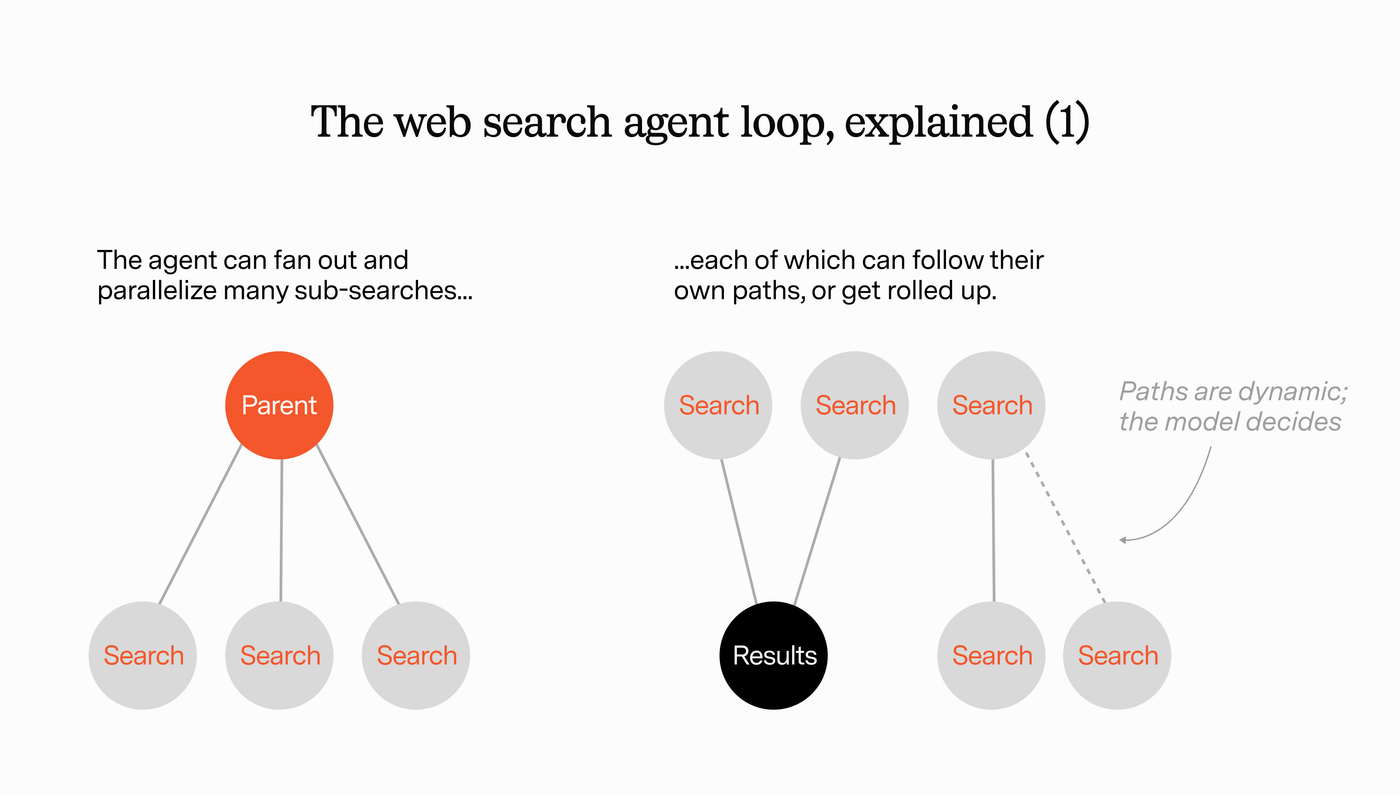
For example, the coordinating web agent might start with a simple search that it fans out to several worker agents. After the first tranche of results is returned, the coordinating agent has new questions based on these results that it wants to investigate, which would require an entirely new and more specific search (using operators).
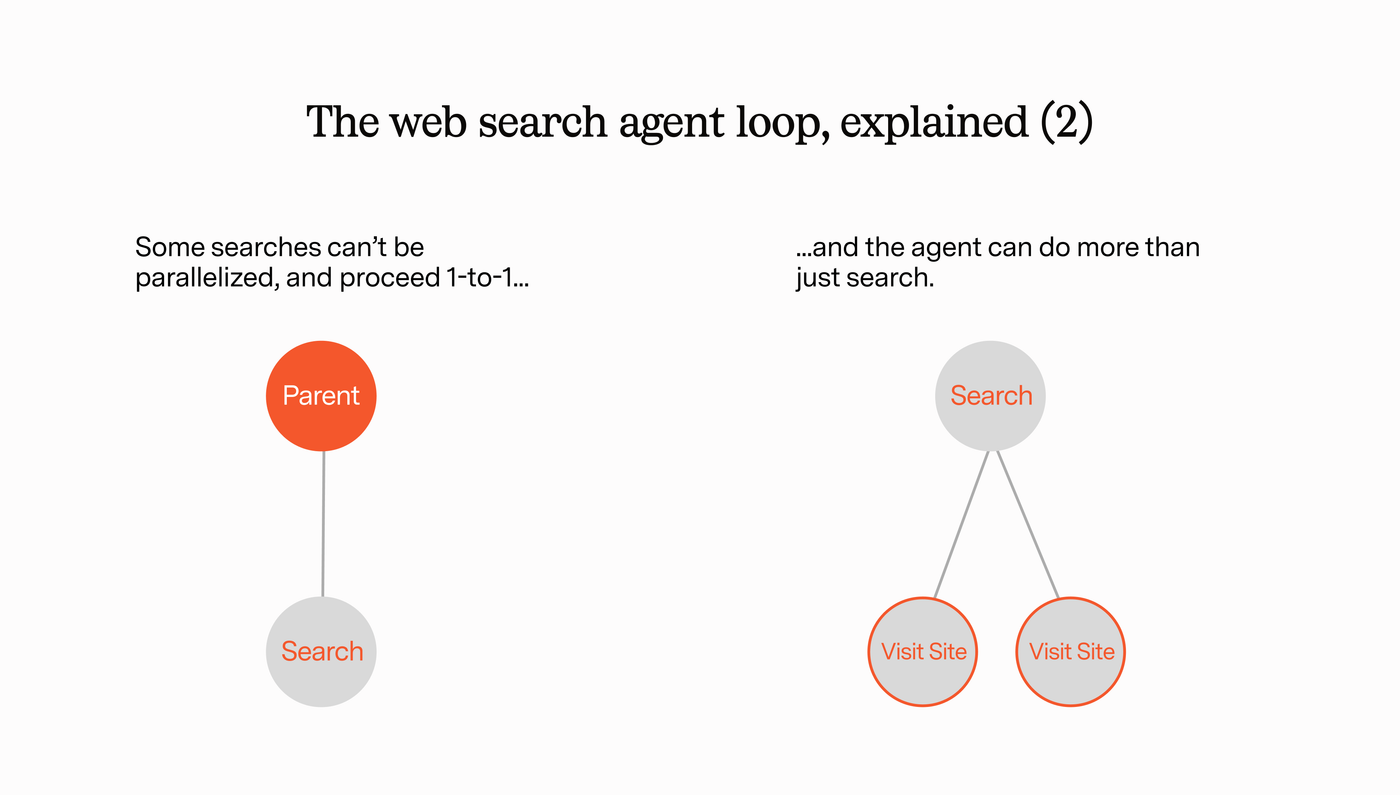
This loop repeats until the coordinating agent feels good enough about the response to return it to the top level model.
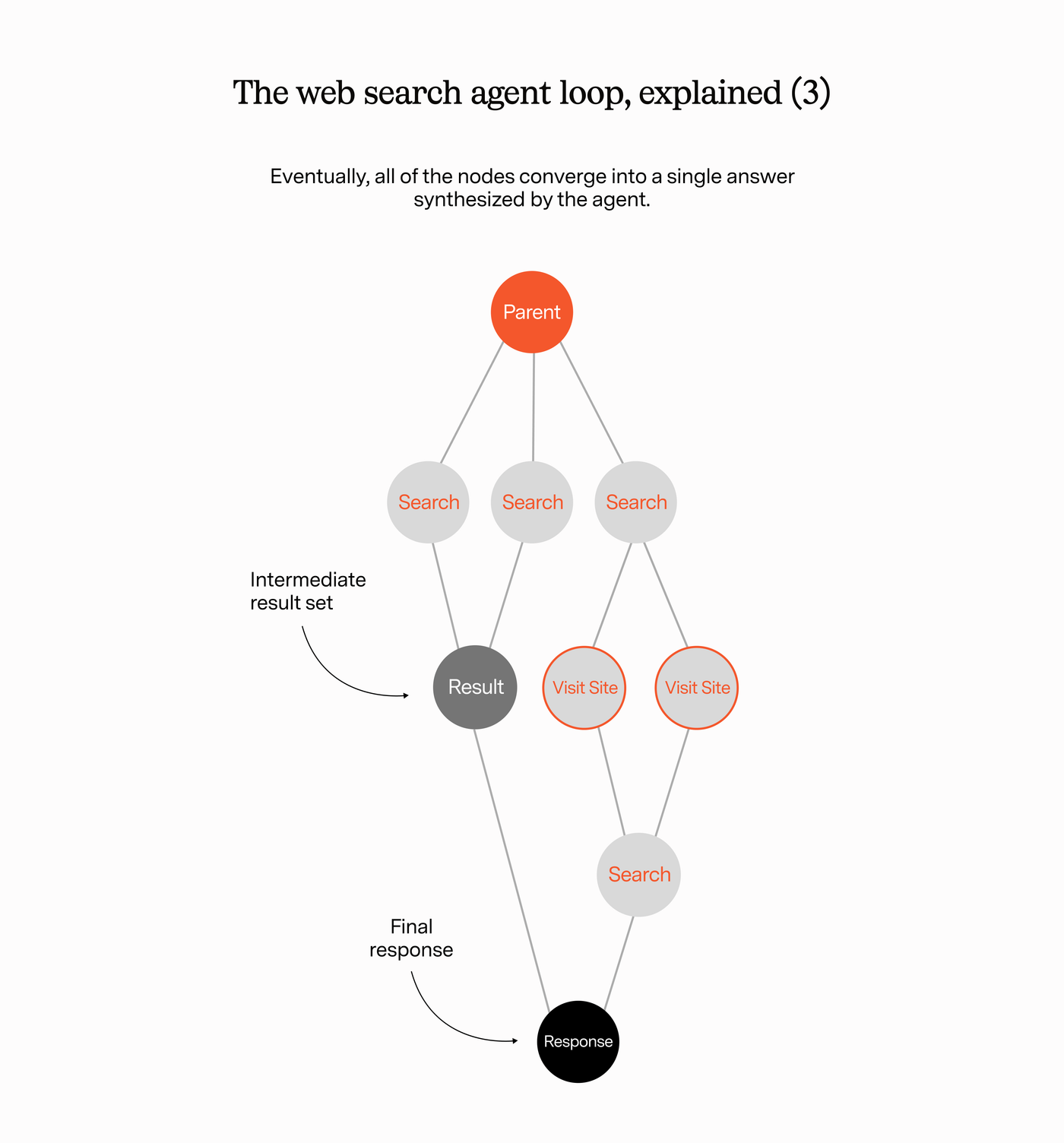
So broadly speaking this is how AI web search works, but things are evolving very quickly (it turns out users still want search).
Today and you’ve got basically 4 types of AI Web Search:
- No search at all.
- Default ChatGPT mode, where the model decides to invoke the web search agent loop.
- Dedicated search mode, where you can actually click a “search” button in ChatGPT.
- (Deep) Research mode.
You can think of these almost like L1 through L4 in self driving. The closer you get to L4, the more the model will search to get a grounded response.
Stay tuned for part 2 where we’ll go into more detail on consumer vs. business use cases, AI search startups like Firecrawl, and more!